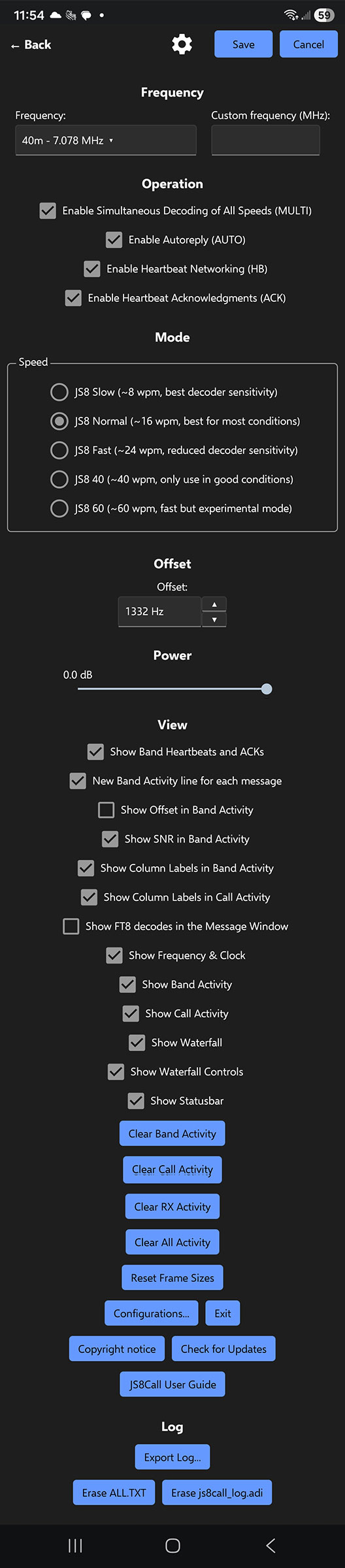
EASY JS8 Settings window
The Settings button in the header opens this window. Changes take effect on Save, except the Clear buttons, which act at once.
Top row
- ⚙: opens the Station window.
Frequency and operation
- Frequency and custom frequency settings. With rig control on, the radio follows the frequency you pick. A custom one is added to the end of the list as Custom.
- Enable Autoreply with Confirmation (AUTO+CONF): answers queries from other stations by itself. With Ask for confirmation before sending autoreply transmissions off in the Station window, it reads Enable Autoreply (AUTO).
- Enable Heartbeat Networking (HB): works only at JS8 Slow, Normal and Fast.
- Enable Heartbeat Acknowledgments (ACK): greyed unless AUTO and HB are both on.
Mode
- Sets the speed you transmit at. The station you're working needs the same speed to decode you, unless it has MULTI on, which decodes every speed at once.
- Each speed sends in a fixed time slot and takes up a set width of the band:
- JS8 Slow: 30-second slots, 25 Hz wide
- JS8 Normal: 15-second slots, 50 Hz wide
- JS8 Fast: 10-second slots, 80 Hz wide
- JS8 40: 6-second slots, 160 Hz wide
- JS8 60: 4-second slots, 250 Hz wide
Offset
- Offset: 0 to 5000 Hz. Tapping the waterfall sets the same number.
Power
- The transmit audio level. Slide right for more power. The number beside it is how far the audio is lowered, in dB.
View
- New Band Activity line for each message: on, each message heard starts its own line. Off, every message at the same offset runs together on one line, as with JS8Call.
- Keep flagged stations at the top of Call Activity: on, stations that sent you a message (⚑) sit above the rest of the list. Off, they take their place in the chosen sort order and keep the ⚑ and the bold text.
- Show FT8 decodes in the Message Window: FT8 signals heard on the JS8 frequency.
- Reset Frame Sizes: puts the dividers back to their first sizes.
Log
- Export Log...: opens Export Options.
- Erase ALL.TXT and Erase js8call_log.adi ask before erasing.